
UI & UX Design
Our Courses
Enquiry Now
UX & UI Design Certificate
Learn the skills to become a UX/UI Designer. This course covers design concepts, industry tools like Figma, and research methodologies. Get career-focused training, build a portfolio, and receive one-on-one mentoring and prepare for a career in UX/UI design.
Course Outline
1. UI Fundamentals
How & when to use common UI patterns
- Menus
- Tabs
- Bottom tab bar
- Buttons (including “Call to action” or CTA)
- Accordion
- Carousel
- Breadcrumbs
- Modals
- Forms
2. Learn Figma
Create Visual Designs & Clickable Prototypes
- Learn how to use Figma to create clickable prototypes to show users for testing, or for clients to see your work.
- Design the UI (user interface of websites, apps, etc) in Figma.
3. UX Design Concepts
Intersection of Design, Technology, & Business
- Through critical analysis understand how user experience as a field sits in the intersection of different areas of the product.
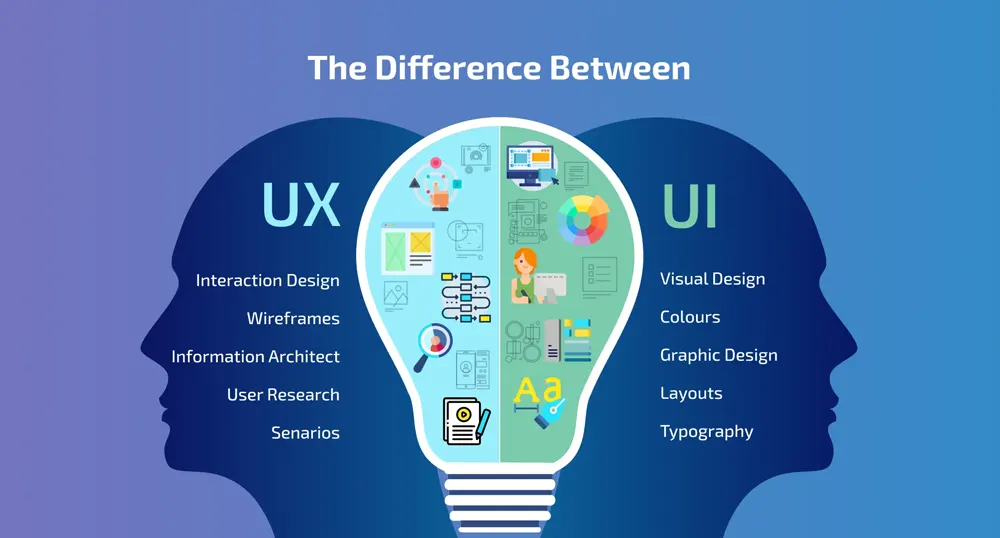
- What is the difference between User Experience Design and User Interface Design?
- Learn about heuristics and apply heuristic evaluation to websites
- Competitive Research
Knowing Your User
- Learn how to structure and conduct user interviews to better identify the needs and current behaviors of the user.
- Understand how to engage the user to work through assumptions and preconceived notions that arise during the process.
- Write down assumptions for your class project.
User Research Through Interviews
- Refine user interview questions.
- Interview classmates for your project.
Refining User Research and Creating Personas
- Create user personas from the interviews to represent the goals and behaviors of the users within the system.
- Develop user scenarios to show when and how the user engages with the system.
Synthesis of User Research, Journey Maps, and User Flows
- Continue to synthesize results of user research to find patterns.
- Create a journey map for your project.
- Think through the different features of the system by building user flows.
- Take the written narrative to the next level through sketching and improvising using techniques such as storyboarding and bodystorming.
Wireframing, Sketching, Prototyping
- Practice a sketching session for an existing website or mobile application of your choice. Start with sketching on a whiteboard or your
notebook. - Sketch wireframes for your class project.
- Learn the power of prototyping and testing an idea. Understand different methods of prototyping and their levels of fidelity.
- Discuss the motivation behind the prototyping, such as newly discovered user goals, business needs and improved functionality.
Prototyping & User Testing
- User testing methods and strategies.
- Do’s and don’ts of user testing.
- Do a user test on your project with a classmate.
- Clearly list the assumptions and test your concepts. Work on multiple iterations of the prototype based on the test results.
Iterating the Prototype and Further User Testing
- Report conclusions based on user testing.
- User testing reports.
- Rework the prototype based on user testing conclusions.
4. Case Studies
Building Case Studies
- Look at case study examples.
- Finish your clickable prototype.
- Using a compilation of user research, prototypes, photographs, and user research, build your case study.
- Present class projects as case studies on-screen
5. Creative Briefs
Getting to Know a Project: Creative Briefs
- What is a Creative Brief?
- What to Include in a Creative Brief
6. Wireframing for UI Designers
Wireframing
- Why and How to Create Wireframes
- Issues to Solve
- Steps in Creating a Wireframe
- Designing on a Grid System (like Bootstrap)
- Get Critiques
- Incorporate Feedback & Improve Your Designs
Wireframe to Refined Design
- Iterate & Refine
- Understanding the Mobile Experience
7. UI or Visual Design Concepts
Learning from Existing Websites & Apps
What Works & What Does Not?
Color
- Color Harmonies
- Creating Contrast with Color
- Guidelines for Proper Color Usage
Typography & Fonts
- Display Text (Such as Headings) versus Body Text
- Legibility
- Type Trends
- Typeface Selection & Pairing
- Where to Get Web Fonts
- Ideal Line Height Column Width (Line Length)
- Hyphenation & Justification
Design Elements
- Proximity
- Similarity
- Continuity
Trends in Web & App Design
Analysis of Example Websites & Apps
Design Patterns
Example Design Patterns
Multiple Screen Sizes
- Responsive Web Design
- Mobile Considerations & Limitations
- Discoverability Challenges
Mobile Navigation
Phone vs Tablet App Design
8. The Business of UX & UI Design
The UX & UI Design Industry
- Getting into the business: strategies and ideas.
- Resources
9. Portfolio Website & Job Preparation
Creating Your Portfolio Website
- Examples of UX & UI portfolio websites
- What you should include on your portfolio website
- Get 1-on-1 feedback on your case studies & portfolio website
Resume Development
- What you should include on your resume
- Get 1-on-1 feedback on your resume